Triage bug screenshots
Check that a screenshot shows the bug and pick the team that gets it.
"It's broken" plus a screenshot is a common bug report, and someone has to look before anyone can fix it. This guide sends the screenshot and the ticket to Sage2 and asks two things at once: does the image show the problem, and which team should take it.
- Images
- Batch
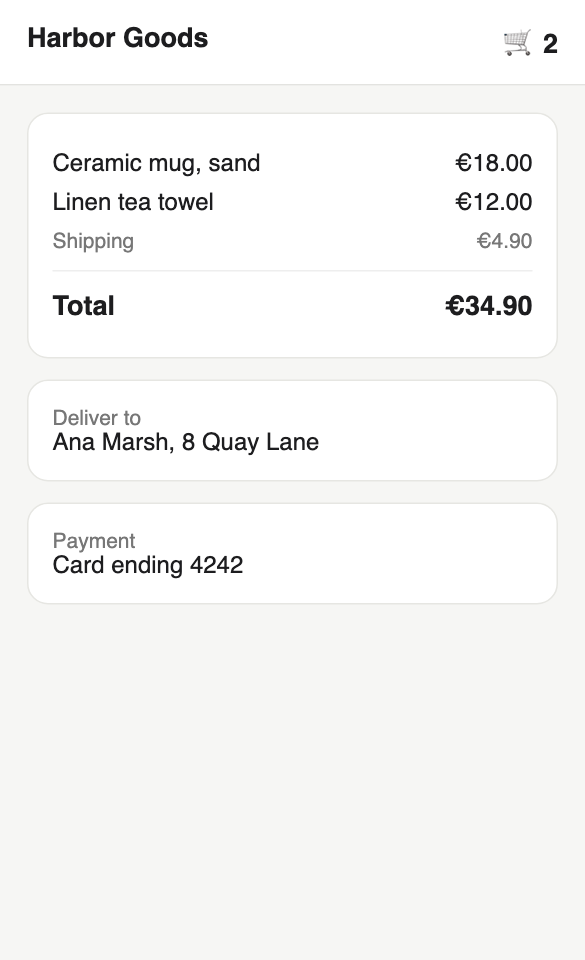
Shows the problem?
Yes95%Team
Recorded run. 185 ms · 541 image tokens · 175 text tokens
Get the code
Set SAGE_API_KEY (get a free key), then run it. Python: pip install requests. TypeScript: Node 22+. Save as recipe.mts and run npx tsx recipe.mts.
A null answer is not an error. Sage2 isn't sure, and each step below says what to do with it. Limits, errors and retries: Limits and errors.
import os
import requests

def sage(path, body):
    r = requests.post(
        "https://sage.levanto.ai" + path,
        headers={"Authorization": f"Bearer {os.environ['SAGE_API_KEY']}"},
        json=body,
        timeout=30,
    )
    r.raise_for_status()
    return r.json()

import base64

path = "screenshot.png"  # PNG, JPEG or WebP
fmt = path.rsplit(".", 1)[-1].lower().replace("jpg", "jpeg")
with open(path, "rb") as f:
    media = f"data:image/{fmt};base64," + base64.b64encode(f.read()).decode()

ticket = "The pay button is missing on my phone."

out = sage("/decide/batch", {
    "requests": [
        {
            "content": {
                "kind": "image",
                "media": media,
                "text": f"Ticket: {ticket}",
            },
            "questions": [
                {
                    "id": "shows_problem",
                    "kind": "yesno",
                    "instructions": "Does the screenshot show the problem described in the ticket?",
                },
                {
                    "id": "team",
                    "kind": "choice",
                    "instructions": "Which team should look at this screenshot?",
                    "options": [
                        {
                            "option": "frontend",
                            "description": "A layout problem, or something missing from the page",
                        },
                        {
                            "option": "backend",
                            "description": "A server or payment error message",
                        },
                        {
                            "option": "support",
                            "description": "The page looks correct, so ask the customer for more detail",
                        },
                    ],
                },
            ],
        },
    ],
})

def answers(out, group=0):
    # Each answer is a full decision. Failed ones (ok is false) are left out: treat a missing id as "not sure".
    return {a["result"]["id"]: a["result"]["result"] for a in out["results"][group]["answers"] if a["ok"]}

a = answers(out)
shows = a.get("shows_problem", {}).get("answer")  # a missing answer reads as not sure
team = a.get("team", {}).get("chosen")
if shows is None or team is None:
    print("Not sure: a person takes a look")
elif shows == "no" or team == "support":
    print("Ask the customer for more detail")
else:
    print("Open a ticket for the", team, "team")
How it works
Image content is an object with
kind: "image", the picture as a base64 data URL inmedia, and optionaltext. Put the customer's ticket intext. Sage2 then judges the image against what the customer said.Images are in beta. Send PNG, JPEG or WebP, up to 4 MiB and 8,192 px on the longest side. Image tokens are billed as input tokens.
Using curl? The curl tab shortens the image in
media. Replace everything afterbase64,with your own image.base64 -i screenshot.png | tr -d '\n'prints it.Runs with the helper from Get the code.
import base64 path = "screenshot.png" # PNG, JPEG or WebP fmt = path.rsplit(".", 1)[-1].lower().replace("jpg", "jpeg") with open(path, "rb") as f: media = f"data:image/{fmt};base64," + base64.b64encode(f.read()).decode() ticket = "The pay button is missing on my phone."/decide/batchtakes a list ofrequests. Each has onecontentand severalquestions, here:shows_problemis a Yes/No question: is the bug on screen?teamis a Choice question between frontend, backend and support.
Both answers come back in one response.
Runs with the helper from Get the code.
out = sage("/decide/batch", { "requests": [ { "content": { "kind": "image", "media": media, "text": f"Ticket: {ticket}", }, "questions": [ { "id": "shows_problem", "kind": "yesno", "instructions": "Does the screenshot show the problem described in the ticket?", }, { "id": "team", "kind": "choice", "instructions": "Which team should look at this screenshot?", "options": [ { "option": "frontend", "description": "A layout problem, or something missing from the page", }, { "option": "backend", "description": "A server or payment error message", }, { "option": "support", "description": "The page looks correct, so ask the customer for more detail", }, ], }, ], }, ], })- Your code
Route the ticket
Open a ticket only when the screenshot supports the report. If it does not, ask the customer for more detail. If either answer is
null, a person looks at it.Runs with the helper from Get the code.
def answers(out, group=0):
    # Each answer is a full decision. Failed ones (ok is false) are left out: treat a missing id as "not sure".
    return {a["result"]["id"]: a["result"]["result"] for a in out["results"][group]["answers"] if a["ok"]}

a = answers(out)
shows = a.get("shows_problem", {}).get("answer")  # a missing answer reads as not sure
team = a.get("team", {}).get("chosen")
if shows is None or team is None:
    print("Not sure: a person takes a look")
elif shows == "no" or team == "support":
    print("Ask the customer for more detail")
else:
    print("Open a ticket for the", team, "team")
Before you ship
- Scale screenshots down before you send them. Image tokens are billed, so a smaller picture costs less.
- A
nois useful. Anoonshows_problemstops an engineer from chasing a bug that is not there. - Set your own bar. Each answer has a
probability. Test on a few hundred past tickets, then assign a team automatically only above the level you trust. - Fast and small. One call answers both questions in about 0.25 s. A phone screenshot scaled to 1,200 px reads about 700 input tokens, most of them for the image.